
Why Your Snowflake Joins Are Slow: Fix OR Joins Fast
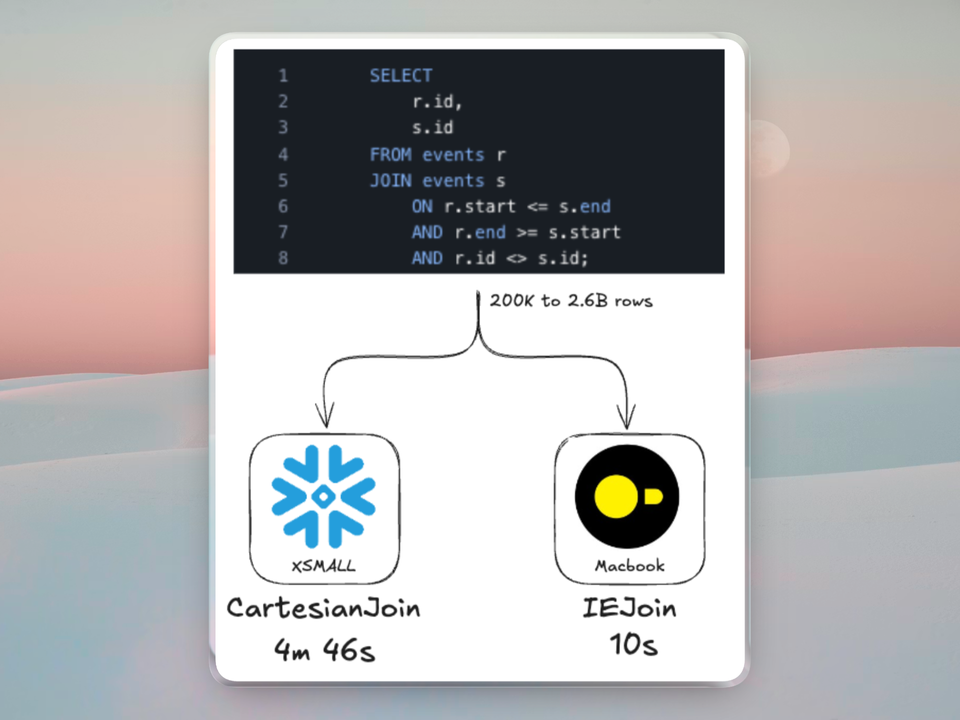
Update (2026-04-10): Snowflake has clarified that disjunctive joins (among others) were historically mislabeled as CartesianJoins in the Query Profile, they were never actually executed as CartesianJoins. Snowflake has since corrected the display and, as of April 4, 2026, the updated operator has been released into Private Preview.
You added one condition to a join and the query went from 2 seconds to 7 minutes.
The join looked reasonable. Two tables, maybe 50,000 rows each, and you needed to match on either a billing ID or a shipping ID. So you wrote ON a.billing_id = b.id OR a.shipping_id = b.id and kicked it off. The warehouse spun up, the query profile showed bytes spilling to remote storage, and the whole thing crawled.
You probably checked the warehouse size first. Then you checked if somebody else was running something heavy. Neither was the problem. The problem was that single OR in the join predicate.
tldr: Disjunctive joins are joins with an
ORcondition in the ON clause. They force Snowflake into a Cartesian product instead of their optimized hash join. Two 50K row tables produce 2.5 billion intermediate rows before Snowflake applies other filters. The fix is usually to rewrite the query as separate equi-joins combined with UNION or UNION ALL, which can improve performance by 200x or more.
How Snowflake Executes Joins
Before diving into what goes wrong with disjunctive joins, it helps to understand what goes right with normal ones. Snowflake's join execution has three layers: the algorithm, the distribution strategy, and micro-partition pruning. All three depend on equality predicates, in other words, equi-joins or joins that use =.
The hash join algorithm
Snowflake's join algorithm is the hash join. It works in two phases:
-
Build phase. Snowflake chooses a build side by using its optimizer to estimate the smaller table after filtering, picks the smaller side of the join, and builds an in-memory hash table keyed on the join column's values. If you are joining
orders.customer_id = customers.id, the hash table is keyed bycustomers.idand stores one or more matching rows for each key. -
Probe phase. Snowflake scans the other table, the probe side. For each row, it hashes the join key and looks it up in the hash table. For every match found, it emits joined row pairs.
In practice, performance depends on the number of matches produced and on whether the hash table fits in memory; if data spills to storage, the join becomes much slower.

Distribution strategies
Because Snowflake runs queries across a cluster of compute resources, join performance depends not just on the local hash join algorithm, but also on where the rows are located during execution. For a hash join to work efficiently, rows with the same join key generally need to be processed together. Snowflake commonly uses two distribution strategies:
-
Broadcast join. The smaller table is copied in full to every compute node. Each node builds a local hash table and probes its local partition of the larger table. This works well when one side is small enough to fit in memory across all nodes.
-
Repartitioned hash join. Snowflake redistributes one or both inputs by hashing the join key so that rows with the same key end up on the same worker. Each worker then performs the hash join on its local partitions. This is usually the better choice when both sides are large.
Both strategies depend on having an equality predicate. You need a column value you can hash to decide which node a row belongs on.
Micro-partition pruning during joins
Snowflake stores data in micro-partitions, these are immutable, compressed chunks of 50 to 500 MB. Each micro-partition carries metadata for every column.
During a hash join, Snowflake performs join pruning. After building the hash table, it summarizes the key values from the build side and ships that summary to the probe side. Micro-partitions on the probe side whose column ranges do not overlap with the summary are skipped entirely.
According to Snowflake's published research on pruning, this eliminates roughly 79% of probe-side micro-partitions on average, with up to 99.99% pruning in some cases. That is a lot of I/O you never pay for as long as the join uses an equality predicate.
What Makes a Join "Disjunctive"
A conjunctive join connects its predicates with AND:
SELECT *
FROM orders o
JOIN customers c
  ON o.customer_id = c.id
  AND o.region = c.region;
Both conditions must be true for a row pair to match. Snowflake can build a hash table on one (or both) equality columns and probe efficiently. That is, a hash table is built on the composite key (customer_id, region).
A disjunctive join connects its predicates with OR:
SELECT *
FROM orders o
JOIN customers c
  ON o.billing_customer_id = c.id
  OR o.shipping_customer_id = c.id;
Either condition can produce a match. This is where things break.
Disjunctive joins are not the only pattern that triggers this behavior. Range joins produce the same problem:
-- Range join: BETWEEN forces the same Cartesian fallback
SELECT *
FROM fact_sales f
JOIN dim_product p
  ON f.product_id = p.product_id
  AND f.sale_date BETWEEN p.valid_from AND p.valid_to;
Any join predicate that Snowflake cannot express as a hash table lookup such as OR conditions, inequality comparisons, BETWEEN, or functions applied to join keys forces Snowflake off the fast path.
Why Disjunctive Joins Break Everything
Hash tables only work for equality
A hash join builds a hash table keyed on one set of columns. When you probe the table, you compute a hash of the probe value and look up the bucket. This only works for equality: given a.id = b.id, you hash b.id and find the matching hash in table a.
With a.billing_id = b.id OR a.shipping_id = b.id, you have two different columns on the left that could match the same column on the right. A single hash table cannot encode both match paths simultaneously. You would need to either:
- Build multiple hash tables (one per OR branch) — this is essentially the UNION or UNION ALL rewrite
- Compare every pair of rows — a Cartesian product
Snowflake chooses option 2.
Cartesian product with post-filter
When Snowflake encounters a disjunctive join, it performs a full or partial Cartesian product of both sides and then applies the OR condition as a post-join filter.
The complexity difference is stark:
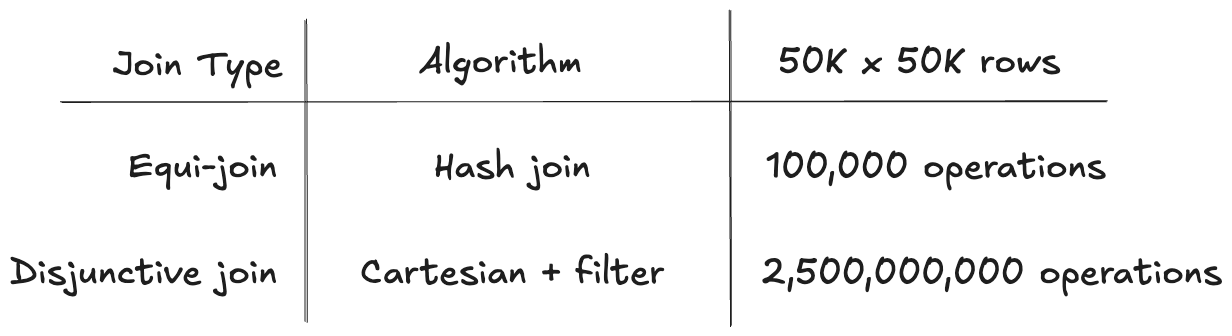
That is a 25,000x difference in work for the same input size.
The double penalty
Disjunctive joins do not just change the join algorithm. They also break micro-partition pruning.
Snowflake's pruning research explains why:
OR expressions present limitations for pruning cutoff — removing filters from OR branches would render the entire expression ineffective.
Snowflake can only prune micro-partitions when it can remove individual filter conditions below AND operators. With OR, removing any branch invalidates the whole expression.
Disjunctive joins do not just slow down the join algorithm. They also prevent Snowflake from pruning micro-partitions on the probe side. You end up scanning more data and processing it less efficiently.
How to Spot a Disjunctive Join in Your Query Profile
If a query is suddenly slow and you are not sure why, open the query profile in the Snowflake web UI and look for these indicators:
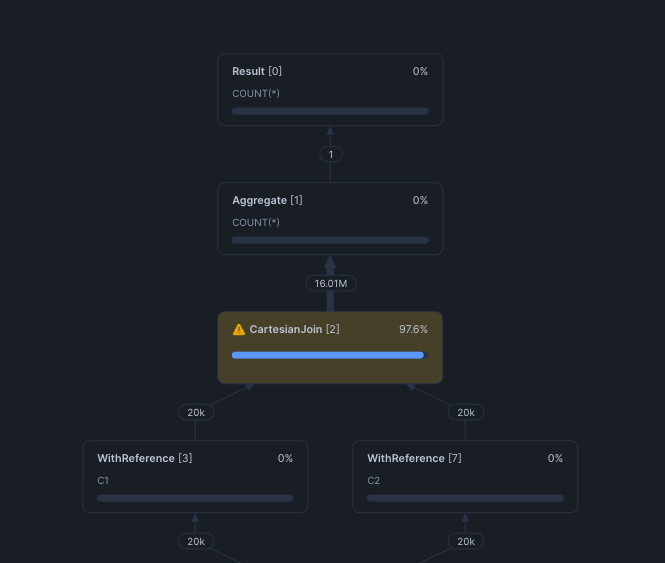
CartesianJoin operator. This is the most direct signal. If you see a CartesianJoin node in the operator tree, Snowflake could not find a usable equality predicate for the join.
Join operator with Additional Join Conditions. Similar to above, Snowflake could not find a usable equality predicate and uses a cartesian join under the hood before applying the filter conditions post-join.
Row count explosion. Look at the row counts flowing through the operator tree. If the output of a join operator is larger than either input table, you likely have a Cartesian product. A healthy equi-join between a 50K-row table and a 100K-row table should produce at most 100K output rows (assuming a many-to-one relationship). If you see millions, something is wrong.
Bytes spilled to local or remote storage. The intermediate Cartesian result set can easily exceed available memory, forcing Snowflake to spill to disk. This shows up in the query profile statistics.
Query Insights. Snowflake's built-in Query Insights system flags these patterns automatically in the web UI:
INEFFICIENT_JOIN_CONDITION— "The join contains a complex join condition that is evaluated after the data sets are joined."EXPLODING_JOIN— The join produced significantly more rows than the input tables.
Four Real-World Patterns That Create Disjunctive Joins
These are the patterns that most often hide disjunctive or Cartesian joins in production SQL.
1. Multi-column entity matching
The most common case. You need to match on whichever identifier is available:
SELECT *
FROM orders o
JOIN customers c
  ON o.billing_customer_id = c.id
  OR o.shipping_customer_id = c.id;
2. Fuzzy or fallback matching
Join on a primary key, fall back to a secondary one:
SELECT *
FROM leads l
JOIN crm_contacts c
  ON l.email = c.email
  OR (l.email IS NULL AND l.phone = c.phone)
  OR (l.email IS NULL AND l.phone IS NULL AND l.first_name || l.last_name = c.full_name);
3. Look ups with date ranges
Lookups use BETWEEN to find the valid record at the time of the fact:
SELECT *
FROM fact_sales f
JOIN dim_product p
  ON f.product_id = p.product_id
  AND f.sale_date BETWEEN p.valid_from AND p.valid_to;
The equality on product_id helps, but the BETWEEN still forces a partial Cartesian product within each product group.
4. Date range overlap detection
Finding overlapping intervals is a natural OR/inequality pattern:
SELECT *
FROM reservations a
JOIN reservations b
  ON a.room_id = b.room_id
  AND a.check_in < b.check_out
  AND a.check_out > b.check_in
  AND a.id != b.id;
How to Fix Disjunctive Joins
Rewrite 1: UNION or UNION ALL (the primary fix)
This is Snowflake's own recommended rewrite. Split the OR into separate equi-joins and combine with UNION or UNION ALL.
Before (disjunctive):
SELECT o.order_id, c.customer_name
FROM orders o
JOIN customers c
  ON o.billing_customer_id = c.id
  OR o.shipping_customer_id = c.id;
After (split into two joins):
SELECT o.order_id, c.customer_name
FROM orders o
JOIN customers c
  ON o.billing_customer_id = c.id

UNION

SELECT o.order_id, c.customer_name
FROM orders o
JOIN customers c
  ON o.shipping_customer_id = c.id;
Why it works. Each branch is now a pure equi-join. Snowflake executes two hash joins instead of one Cartesian product.
Use UNION if a row could match on both columns and you need deduplication. Use UNION ALL if duplicates are acceptable or impossible by design.
The Snowflake community documents 200x+ improvement from this rewrite pattern alone.
Rewrite 2: COALESCE for fallback logic
If the OR really means "try column A first, fall back to column B," COALESCE can convert it to a single equi-join:
Before:
SELECT *
FROM orders o
JOIN customers c
  ON o.primary_customer_id = c.id
  OR o.secondary_customer_id = c.id;
After:
SELECT *
FROM orders o
JOIN customers c
  ON COALESCE(o.primary_customer_id, o.secondary_customer_id) = c.id;
Caveat: This changes the semantics. The OR version returns matches for both primary AND secondary. The COALESCE version only uses the first non-null value. Only use this when you know the OR was expressing priority logic, not "match on either."
Also note that applying a function to the join key can prevent search optimization and partition pruning on that column.
Rewrite 3: Binning for range joins
For range joins (BETWEEN, <, >), add a synthetic equi-join column using time or value bins:
Before (range join):
SELECT q.query_id, s.session_id
FROM query_log q
JOIN sessions s
  ON q.query_start BETWEEN s.session_start AND s.session_end;
After (binned):
WITH binned_queries AS (
  SELECT *,
    FLOOR(EXTRACT(EPOCH FROM query_start) / 3600) AS hour_bin
  FROM query_log
),
binned_sessions AS (
  SELECT *,
    FLOOR(EXTRACT(EPOCH FROM session_start) / 3600) AS hour_bin
  FROM sessions
)
SELECT q.query_id, s.session_id
FROM binned_queries q
JOIN binned_sessions s
  ON q.hour_bin = s.hour_bin
  AND q.query_start BETWEEN s.session_start AND s.session_end;
Why it works. The equi-join on hour_bin partitions the data into smaller groups. The BETWEEN condition is only evaluated within each group, not across the entire dataset. That is, the Cartesian product happens inside each bin instead of across all rows.
Select.dev benchmarked this approach and measured a 300x improvement — from 750 seconds to 2.2 seconds on the same data.
How to pick a bin size. Use the 90th percentile of your interval length. If 90% of your sessions are under 2 hours, a 2-hour bin keeps most comparisons within a single bin while keeping each bin small enough to avoid large Cartesian products.
Rewrite 4: ASOF JOIN for time-series lookups
If you are matching events to their nearest record, Snowflake's ASOF JOIN handles this natively without a Cartesian product:
Before (range join):
SELECT t.trade_id, p.price
FROM trades t
JOIN prices p
  ON t.symbol = p.symbol
  AND p.price_time <= t.trade_time
QUALIFY ROW_NUMBER() OVER (
  PARTITION BY t.trade_id ORDER BY p.price_time DESC
) = 1;
After (ASOF JOIN):
SELECT t.trade_id, p.price
FROM trades t
ASOF JOIN prices p
  MATCH_CONDITION (t.trade_time >= p.price_time)
  ON t.symbol = p.symbol;
ASOF JOIN uses a merge-based algorithm that avoids the Cartesian product entirely. It finds the closest match in sorted order — no binning, no split-join rewrite, no workarounds. Performance improvements of 100x are documented.
Limitations: ASOF JOIN only supports conjunctive (AND) conditions in the ON clause. It matches exactly one row from the right table per left row. It works when your semantics are "find the closest match," not "find all matches."
Rewrite 5: Pre-filter both sides
Regardless of which rewrite you use, always filter both sides of the join before joining. This reduces the Cartesian product size when Snowflake still has to fall back to one:
WITH recent_orders AS (
  SELECT * FROM orders WHERE order_date >= '2024-01-01'
),
active_customers AS (
  SELECT * FROM customers WHERE status = 'active'
)
SELECT o.order_id, c.customer_name
FROM recent_orders o
JOIN active_customers c
  ON o.billing_customer_id = c.id
  OR o.shipping_customer_id = c.id;
If pre-filtering reduces both sides from 1M rows to 10K rows, the Cartesian product drops from 1 trillion intermediate rows to 100 million, a 10,000x reduction. This is not a substitute for the split-join rewrite, but it limits the damage when a Cartesian product is unavoidable.
Why Some Engines Behave Differently
The Cartesian fallback is not a law of physics. It is a design choice that Snowflake makes because its join engine is built around hash joins, and hash joins require equality.
In practice, Snowflake can outperform other query engines on disjunctive joins. DuckDB, for example, may use nested loops for certain disjunctive patterns, these are similar to Cartesian joins but can be up to 2x slower.
Other engines have invested in specialized algorithms for non-equality join patterns.
DuckDB's IEJoin
DuckDB implements the IEJoin (Inequality Join) algorithm, purpose-built for joins with two inequality conditions. Instead of comparing every pair of rows, IEJoin:
- Sorts both tables on the first condition key
- Merges row identifiers into a combined structure
- Sorts positions by the second condition key
- Uses bitmap scanning to find matches satisfying both conditions
DuckDB's published benchmarks show the difference with up to 78x performance boosts over nested loop joins.
No SQL rewrite required. The query optimizer recognizes the inequality pattern and routes it to the IEJoin operator automatically.
PostgreSQL
PostgreSQL also falls back to nested loop joins for OR conditions, but it can mitigate the cost with index scans on the inner loop. Snowflake has no row-level indexes, so it cannot use this optimization.
What this means for multi-engine queries
This is one of the cases where the right answer is not to rewrite the query. It is to run it on a different engine.
Queries with certain patterns in Snowflake are often structurally better suited for DuckDB, and the same can be true the other way around. The same SQL, the same data, and up to 30x speedup because the engine has a better algorithm for that specific join pattern.
This is also the kind of workload-to-engine matching that Greybeam is built for. Instead of forcing every query through a single query engine or asking teams to hand-rewrite every edge case, Greybeam can route the patterns to the engine, Snowflake or DuckDB, that is best suited for their execution without any migration.
Wrapping Up
Most Snowflake performance tuning focuses on warehouse sizing, clustering keys, and caching. Those are important. But knowing how to spot and rewrite a disjunctive join is one of the highest-leverage skills you can have, because the performance difference is not 2x or 3x. It is 200x.
The pattern is simple to identify (look for OR in your join predicates), the fix is well-documented (split the join into UNION or UNION ALL branches), and the payoff is immediate. If you have queries in your Snowflake account that are slower than they should be, this is one of the first things to check.
The longer-term trend is toward engines and architectures that handle more join patterns natively, so the SQL you write does not need to work around the limitations of a single execution engine. Until then, knowing where those limitations are puts you ahead.

Comments ()