
Why Is My Snowflake Bill So High and How to Reduce It
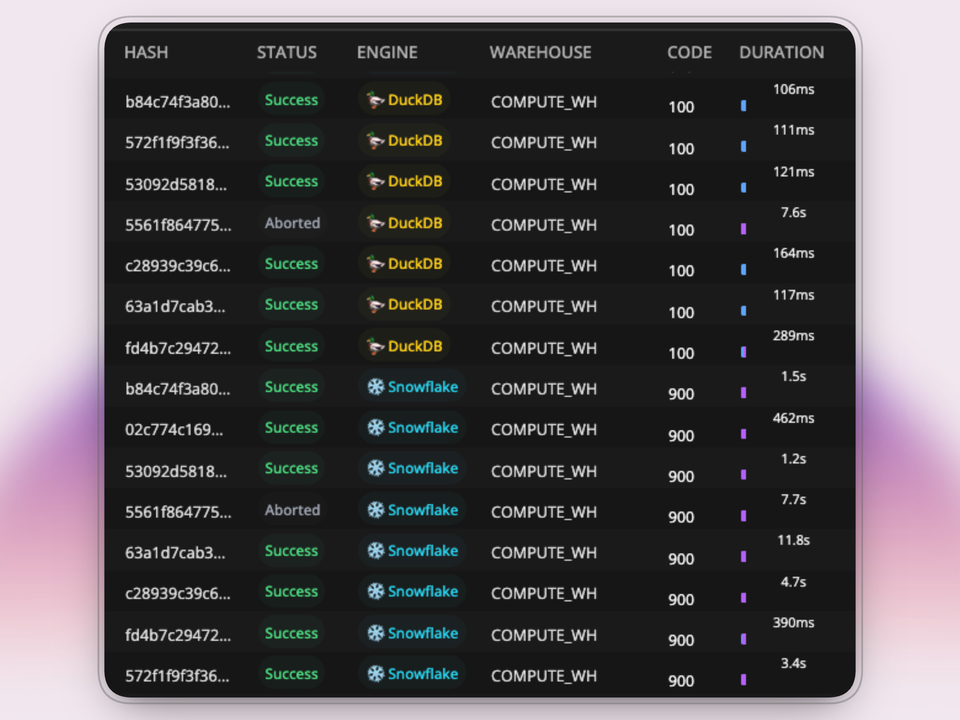
You're in the weekly Snowflake optimization review. Snowflake is over budget again. The team already did the normal cleanup pass: 60 second auto-suspend, smaller warehouses, and optimization on the longest running queries. Finance still asks the same question: if we already optimized Snowflake, why is the bill still this high?
What Actually Makes a Snowflake Bill High?
Snowflake charges compute in credits. Credit pricing varies by edition and contract, but the mechanics are simple: warehouses bill per-second that they are active, larger warehouses consume credits faster, and every warehouse carries a 60-second billing minimum. An X-Small warehouse uses 1 credit per hour, a Small uses 2, a Medium uses 4, a Large uses 8, etc.
For most teams, five keys things contribute to your bill.
1. Short queries trigger a full minute of billing
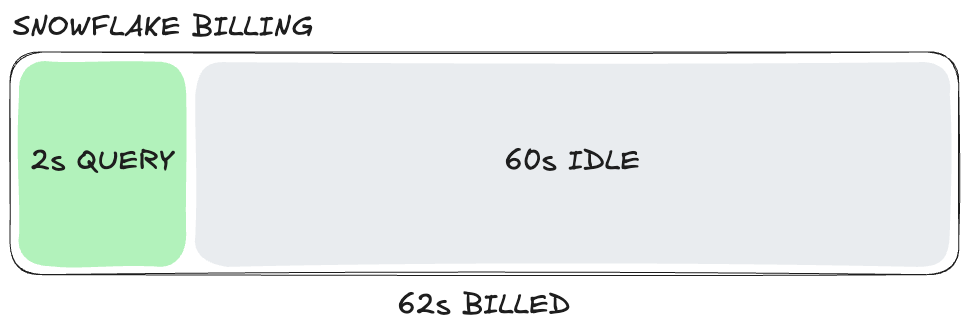
This is the trap most analytical workloads fall into. A warehouse starts for a 2 second query, and yet, you'll have to pay for 60 seconds of compute.
Dashboards, embedded analytics, and self-serve reporting tend to arrive in bursts. If those bursts keep waking up the same warehouse, the cost of idle time matters more than the cost of the query itself. Idle time is the time your warehouse spends doing nothing. For example, a 2 second query resumes your warehouse with a 60 second auto-suspend window, if nothing else comes in, you've paid for 62 seconds to get 2 seconds of work.
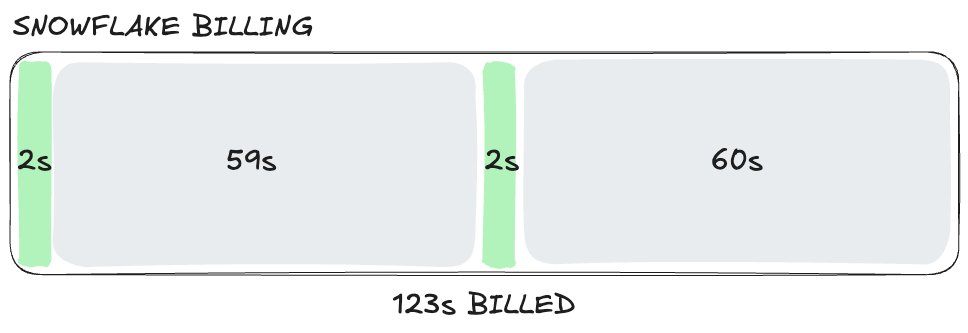
Now imagine a second 2 second query lands at second 59: the auto-suspend timer resets, and you've paid for 124 seconds to run 4 seconds of work. Continue this pattern across thousands of queries per day across multiple warehouses and idle time becomes your biggest line item.
2. Warehouses are sized for the hardest query, not the average one
Most teams size warehouses for the largest query.
If your hardest join needs a Medium, but most of your dashboard traffic would be fine on an X-Small, you're effectively taxing the average query to ensure the edge case runs fast.
3. Refresh schedules run more often than the business needs
An unsurprising amount of warehouse spend is just refreshing data. If a dashboard gets opened once in the morning, hourly refreshes are often wasted spend. If a downstream team really only cares about yesterday's numbers, near-real-time pipelines are buying you very little.
This is one of the easiest wins in warehouse cost control: align data freshness to actual SLAs.
4. Too many warehouses create idle spend and cold caches
A common recommendation is to provision a separate warehouse for each team or workload so you can clearly attribute costs and usage. That sounds disciplined, and Snowflake's own cost and activity views naturally reinforce it because warehouses are the unit most teams look at first.
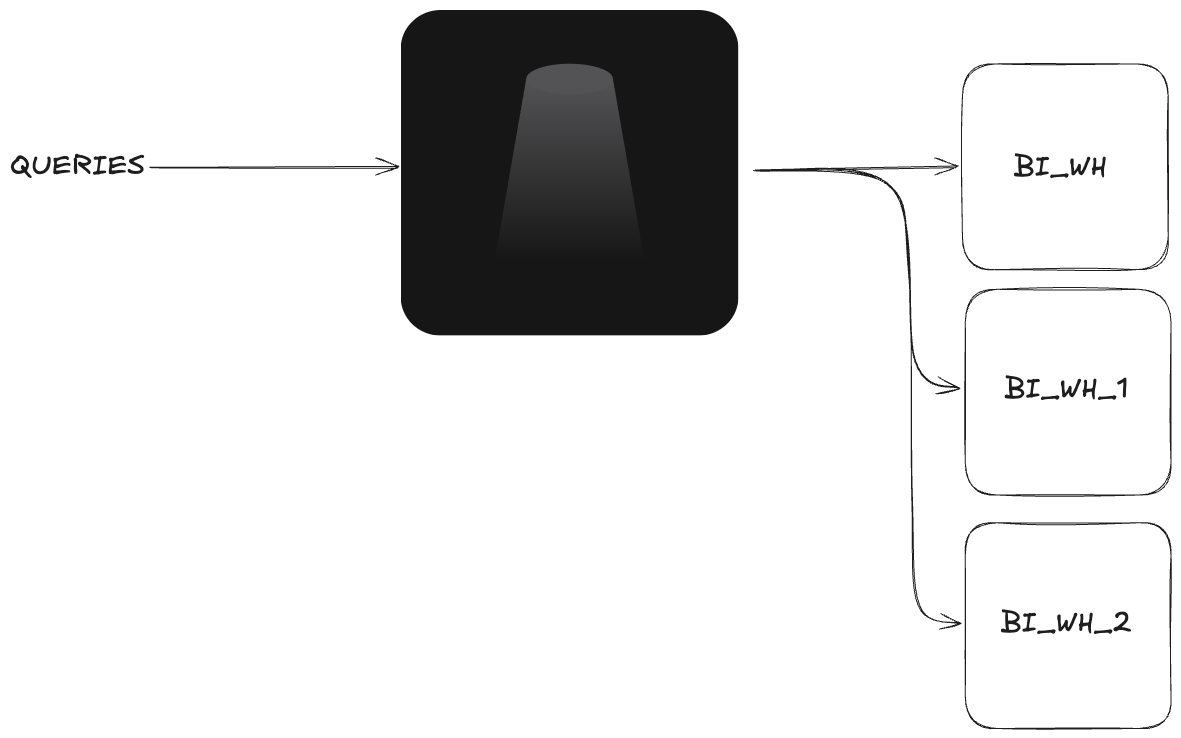
The problem is that each warehouse suspends and resumes on its own clock. Each one has its own 60 second minimum, its own idle gaps, and its own cache. If finance runs a 2 second dashboard query on FINANCE_WH and a few seconds later your developers run a 2 second ad hoc query on DEV_WH, you are now paying for two separate 60 second billing windows.
Keep repeating that pattern across finance, product, operations, and development, and the idle time compounds fast. You're not just splitting workloads, you're multiplying 60 second billing windows and scattering small bursts of activity across more warehouses than the workload actually needs.
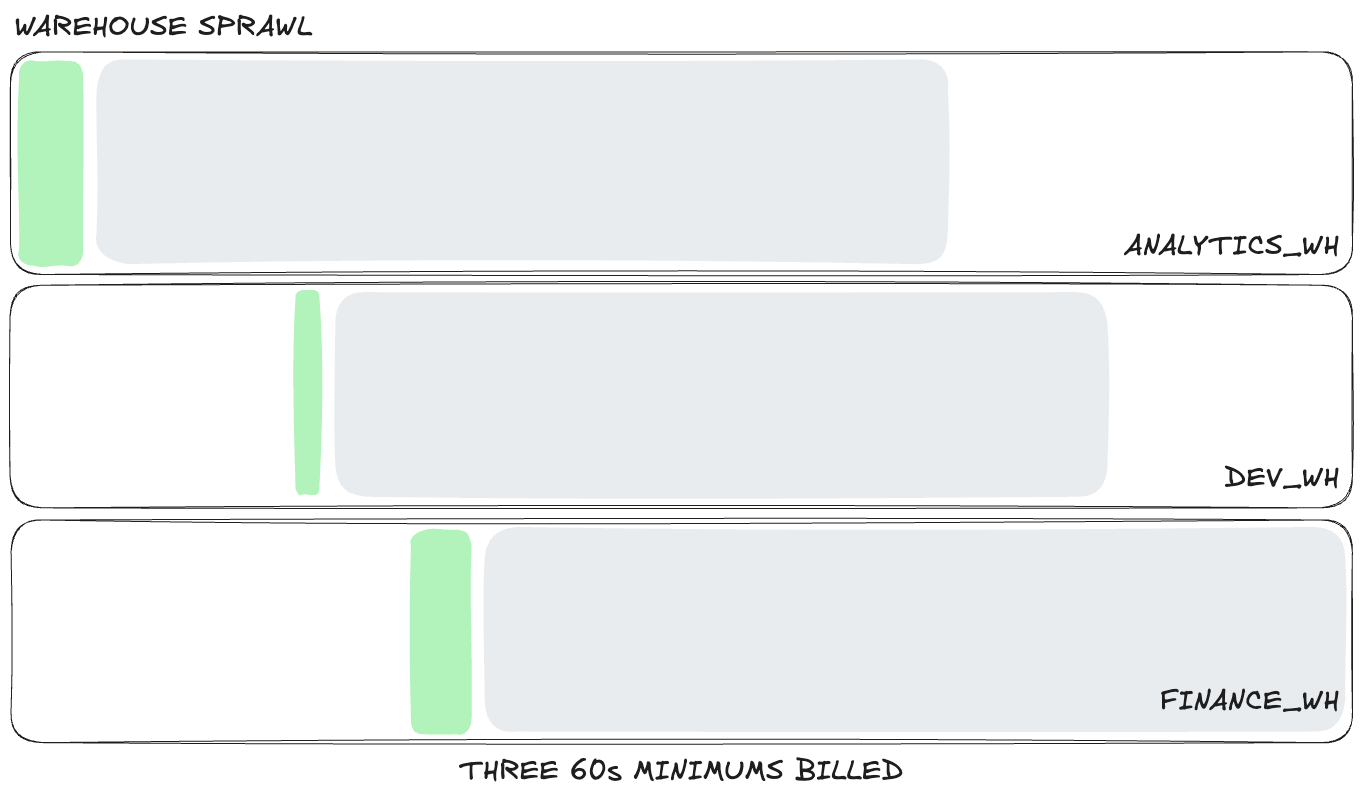
For similar read-heavy traffic, consolidation is cheaper than isolation. If those short queries land on the same warehouse, more of them can share the same active minute instead of each warehouse starting its own billing clock. You also get better cache reuse, which can reduce work further.
The catch is concurrency. On Snowflake Standard tier, multi-cluster warehouses are not available, so teams often handle queueing by scaling a warehouse up instead. That can help with bursts of demand, but it drops you right back into point 2: now the warehouse is sized for the busiest moment rather than the average query.
What you actually want is to keep similar workloads consolidated while still having a way to add parallel capacity when workloads spike. Greybeam can do that for users on Snowflake Standard Edition accounts by routing queued queries to other warehouses, which gives teams a form of horizontal scaling without upgrading to Enterprise or forcing every query onto a larger warehouse.
5. Missing guardrails let expensive queries run unchecked
Snowflake is very good at turning mistakes into credits. One runaway query, one badly scoped BI explore, or one scheduled job pointed at the wrong warehouse can distort a month of spend, especially if it lands on a larger warehouse and runs longer than anyone expected.
The core issue is that, without guardrails, abnormal behavior gets billed just as happily as legitimate work. Resource monitors, statement timeouts, and warehouse controls do not make your normal workload cheaper. But, they stop one bad query or one bad schedule from becoming a spike in costs.
If those controls are missing, you are effectively assuming every dashboard, analyst, and scheduled job will behave perfectly.
Do the Snowflake Hygiene Work First
Before you add any new layer, do the boring fixes inside Snowflake. We do this with every Greybeam customer, and it is good advice whether or not you ever use Greybeam.
- Audit warehouse sizing against real query patterns, not intuition.
- Set auto-suspend based on actual gaps in traffic. Snowflake warehouses default to 5 minutes, but realistically 60 seconds is almost always ideal. Depending on the workload you can set this lower, but if you set it too low, you can trigger multiple 60-second minimums within the same period.
- Check whether older warehouses are still on Gen1 and test Gen2 where it it makes sense. For some workloads, Gen2 can improve performance per credit. You should also check the opposite, do your workloads really benefit from a Gen2?
- Put resource monitors and statement timeouts in place.
- Align refresh cadence to real business SLAs.
- Consolidate similar read-heavy workloads where it improves cache reuse and reduces idle warehouses.
Do all of that first, and if you're still concerned about costs, it might be time to consider a multi-engine approach.
Snowflake optimization reduces waste within Snowflake, but the floor is your cost per credit. Multi-engine queries change where the compute happens, avoiding Snowflake pricing entirely.
Why Multi-Engine is the Real Fix
Most teams do not have a Snowflake problem. They have a workload placement problem.
If your workload is mostly BI, embedded analytics, or repeated short queries, a large share of those queries do not need a distributed warehouse. These types of queries are filtered aggregations, joins across a few tables, and reporting rollups that scan moderate amounts of data and return small result sets.
That's where smaller analytical engines like DuckDB get interesting. DuckDB runs on a single machine, is fast for read-heavy analytical workloads, and can be much cheaper than keeping a cloud warehouse active for every short query.
Snowflake is still the right engine for plenty of workloads. It's just become an expensive default that teams are trapped on.
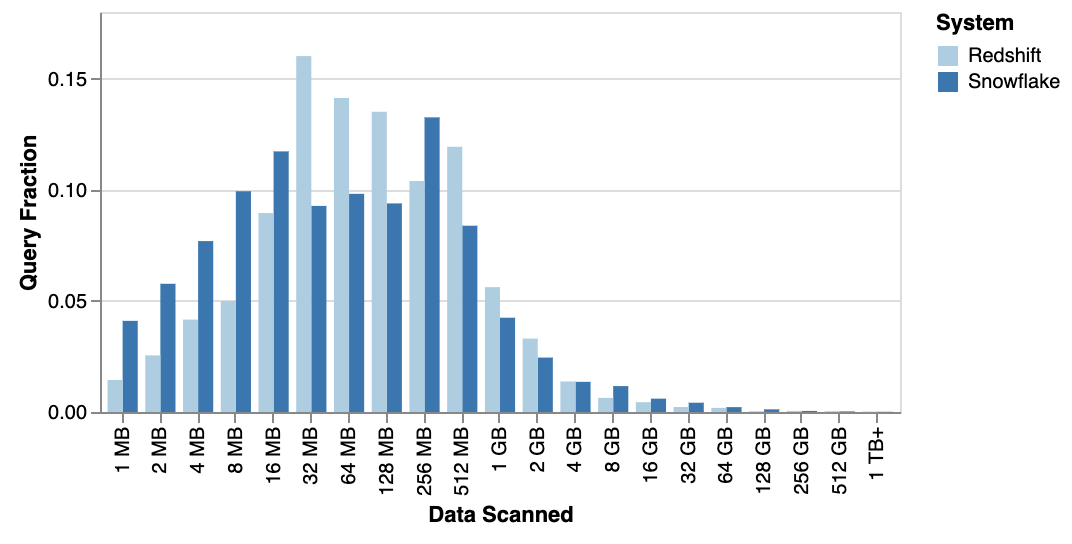
Public workload analyses point in the same direction. In Fivetran's analysis of Snowflake and Redshift usage, the 99.9th-percentile query scanned about 300 GB. In MotherDuck's analysis of the Redset benchmark, only 1.1% of queries fell in the 100 GB to 1 TB bucket, which implies roughly 99% scanned under 100 GB.
Apache Iceberg makes this model much cleaner
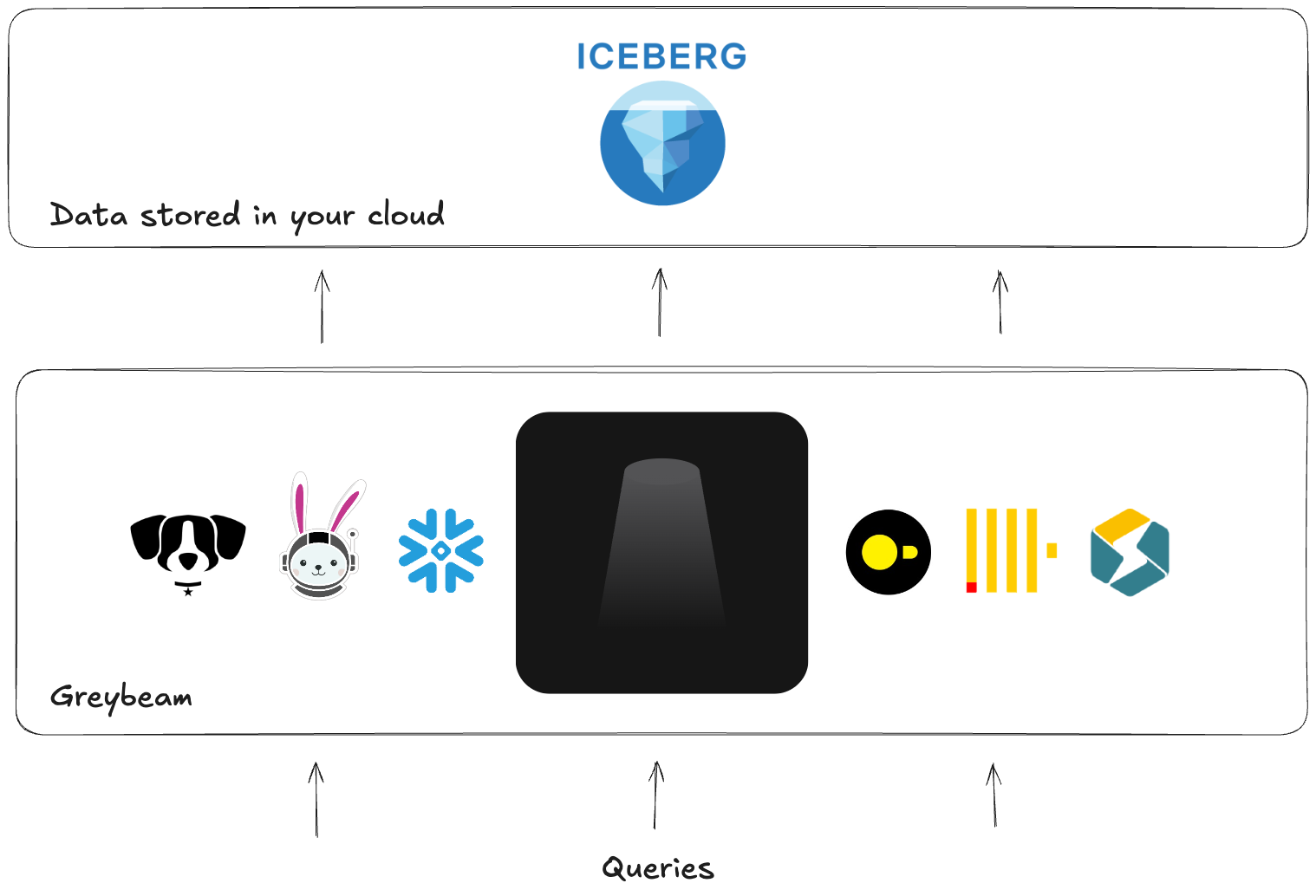
This gets even more interesting with Apache Iceberg. When your data is stored as Iceberg in object storage, multiple engines can read the same data. Snowflake Horizon Catalog can also expose Snowflake-managed Iceberg tables to external engines such as DuckDB, Spark, Dremio, and Trino.
In practice, that means the table can stay in place while different engines read it through a shared catalog layer. You are simply changing compute, not rebuilding your entire infrastructure.
That is what makes multi-engine queries practical. The question stops being "How do I optimize Snowflake?" and becomes "Which engine should run this query?"
Why most teams do not build this themselves
The hard part is not running DuckDB. The hard part is making the whole system behave like nothing changed.
To do this well, you need:
- A proxy between your applications and Snowflake
- Execution infrastructure that can actually run the routed queries, which means deciding how to provision the servers that host DuckDB, how to size them, and how to scale them as workload patterns change
- SQL translation for dialect differences
- A storage and catalog layer that can resolve databases, schemas, table names, and namespaces cleanly so the routed query can read the right data without the downstream tool feeling any difference
- Validation so results stay correct across engines
- Result compatibility so returned columns, data types, formats, and other query semantics still look correct to the downstream application
- Routing logic that knows what should stay on Snowflake
- Observability, retries, and operational guardrails
Most of the real engineering work is in compatibility and correctness, not in spinning up another engine.
Where Greybeam fits
Greybeam is a drop-in proxy for this model. You update the connection string in Looker, dbt, or anything else that speaks Snowflake, and Greybeam provides the end-to-end infrastructure required to automatically translate queries, decide which engine executes them best, the engines themselves, horizontal scaling, observability, retries... You get the point.
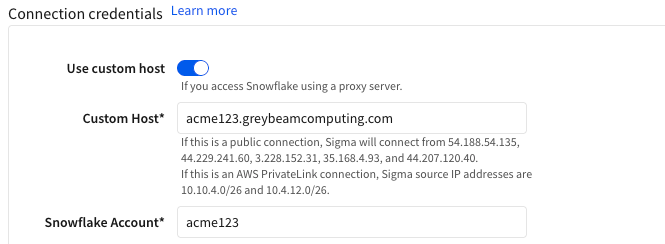
In practice, that means no migration project and no SQL rewrites. Queries can seamlessly fly to DuckDB, while writes queries, large scans, and Snowflake-specific behavior can stay on Snowflake (write query support within Greybeam are on the roadmap!). The developer experience stays the same. Costs reduce as high as 98%.
What the Results Look Like
Across read-heavy workloads, Greybeam typically reduces Snowflake costs between 75% to 98%. The exact number depends on how much of the workload is repetitive, read-heavy, and compatible with a cheaper execution engine.
Headset saw 93% cost reduction, while Xometry say 78% reduced Snowflake costs and 3x faster queries.
How to Audit Your Snowflake Bill Right Now
Before you buy anything or rewrite anything, measure the workload you actually have. The goal is to answer one question:
How many queries are actually small?
1. What percentage of queries are actually small?
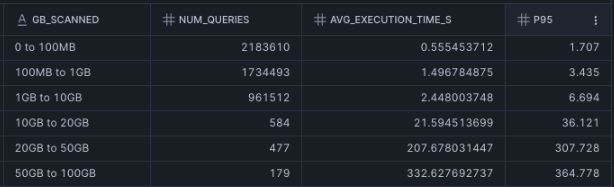
Use 100 GB as a rough cutoff for query size. If more than 80% of your read queries fall below that line, it is a strong sign that a large share of your workload is a candidate for multi-engine routing. That signal is even stronger if those queries are landing on Small warehouses or larger.
-- Update the SET command below to your READ warehouses, this usually your BI warehouse but may include any other read workloads

SET warehouse_names = 'COMPUTE_WH, DEV_WH';

SELECT
    CASE
        WHEN bytes_scanned / power(1024,3) < 0.1 THEN 1
        WHEN bytes_scanned / power(1024,3) < 1 THEN 2
        WHEN bytes_scanned / power(1024,3) < 10 THEN 3
        WHEN bytes_scanned / power(1024,3) < 20 THEN 4
        WHEN bytes_scanned / power(1024,3) < 50 THEN 5
        WHEN bytes_scanned / power(1024,3) < 100 THEN 6
        WHEN bytes_scanned / power(1024,3) < 200 THEN 7
        WHEN bytes_scanned / power(1024,3) < 500 THEN 8
        WHEN bytes_scanned / power(1024,3) < 1000 THEN 9
        ELSE 10 END as gb_ranking
    , CASE
        WHEN bytes_scanned / power(1024,3) < 0.1 THEN '0 to 100MB'
        WHEN bytes_scanned / power(1024,3) < 1 THEN '100MB to 1GB'
        WHEN bytes_scanned / power(1024,3) < 10 THEN '1GB to 10GB'
        WHEN bytes_scanned / power(1024,3) < 20 THEN '10GB to 20GB'
        WHEN bytes_scanned / power(1024,3) < 50 THEN '20GB to 50GB'
        WHEN bytes_scanned / power(1024,3) < 100 THEN '50GB to 100GB'
        WHEN bytes_scanned / power(1024,3) < 200 THEN '100GB to 200GB'
        WHEN bytes_scanned / power(1024,3) < 500 THEN '200GB to 500GB'
        WHEN bytes_scanned / power(1024,3) < 1000 THEN '500GB to 1TB'
        ELSE '1TB+' END as gb_scanned
    , COUNT(*) as num_queries
    , AVG(execution_time)*0.001 as avg_execution_time_s
    , PERCENTILE_DISC(0.95) WITHIN GROUP (ORDER BY execution_time ASC)*0.001 as p95
FROM snowflake.account_usage.query_history AS qh
WHERE
    1=1
    AND qh.warehouse_name IN (SELECT TRIM(VALUE) FROM TABLE(SPLIT_TO_TABLE($warehouse_names, ',')))
    AND qh.warehouse_size IS NOT NULL
    AND qh.start_time >= current_date - 90
    AND qh.query_type = 'SELECT'
GROUP BY 1,2
ORDER BY 1 ASC;
We typically see the best results when these workloads are running on multi-cluster warehouses or on Small warehouses and above, because teams are often sizing for concurrency rather than true query complexity. That is exactly where routing smaller read queries to a cheaper engine can change the cost profile the most.
How to interpret the audit
If most of your read workload is concentrated in the smaller buckets, especially below 100 GB, and those queries are returning in just a few seconds, you likely do not have a pure query optimization problem. You have an engine mismatch.
At that point, you can keep tuning warehouse settings, but you are working the margins. The bigger lever is choosing a better execution path.
If you want a quick outside read on the numbers, Greybeam offers a savings estimate.
Interoperability is the Future of the Data Stack
The industry is moving away from the idea that one warehouse fits all. Open table formats and open source analytical engines are making it normal to separate storage from compute and pick the engine that actually matches the query.
That is the bigger frame for Snowflake cost control. Sometimes the answer is better warehouse hygiene. Sometimes the answer is that Snowflake is still the right engine. But for a large class of analytics queries, the cheapest optimization is usually not another warehouse configuration. It is choosing a different engine.

Comments ()